
Braze
Set up Braze → JustAI data ingestion so JustAI can measure performance (send/open/click/conversion) and power downstream workflows. This is one-time setup - all templates will share this configuration.
What Ingress Includes
Section titled “What Ingress Includes”JustAI ingests Braze reporting events via Braze Currents. This provides the core metrics needed for analysis (opens, clicks, sends, conversions), as well as custom metrics that are important to you.
Before You Start
Section titled “Before You Start”- Confirm which Braze workspace you’re connecting.
- Identify your JustAI org slug (usually your company name in all lower case - feel free to ask us).
- Make sure you have permissions to create API credentials and Connected Content calls in Braze.
API Key Setup
Section titled “API Key Setup”JustAI integrates with Braze to fetch canvases and messages when creating new templates. This requires a REST API key from your Braze account.
Step 1: Create the API Key in Braze
Section titled “Step 1: Create the API Key in Braze”-
Navigate to Settings → APIs and Identifiers.
-
Click Create API Key.
-
Set the name to “JustAI”.
-
Leave the IP Allowlist empty.
-
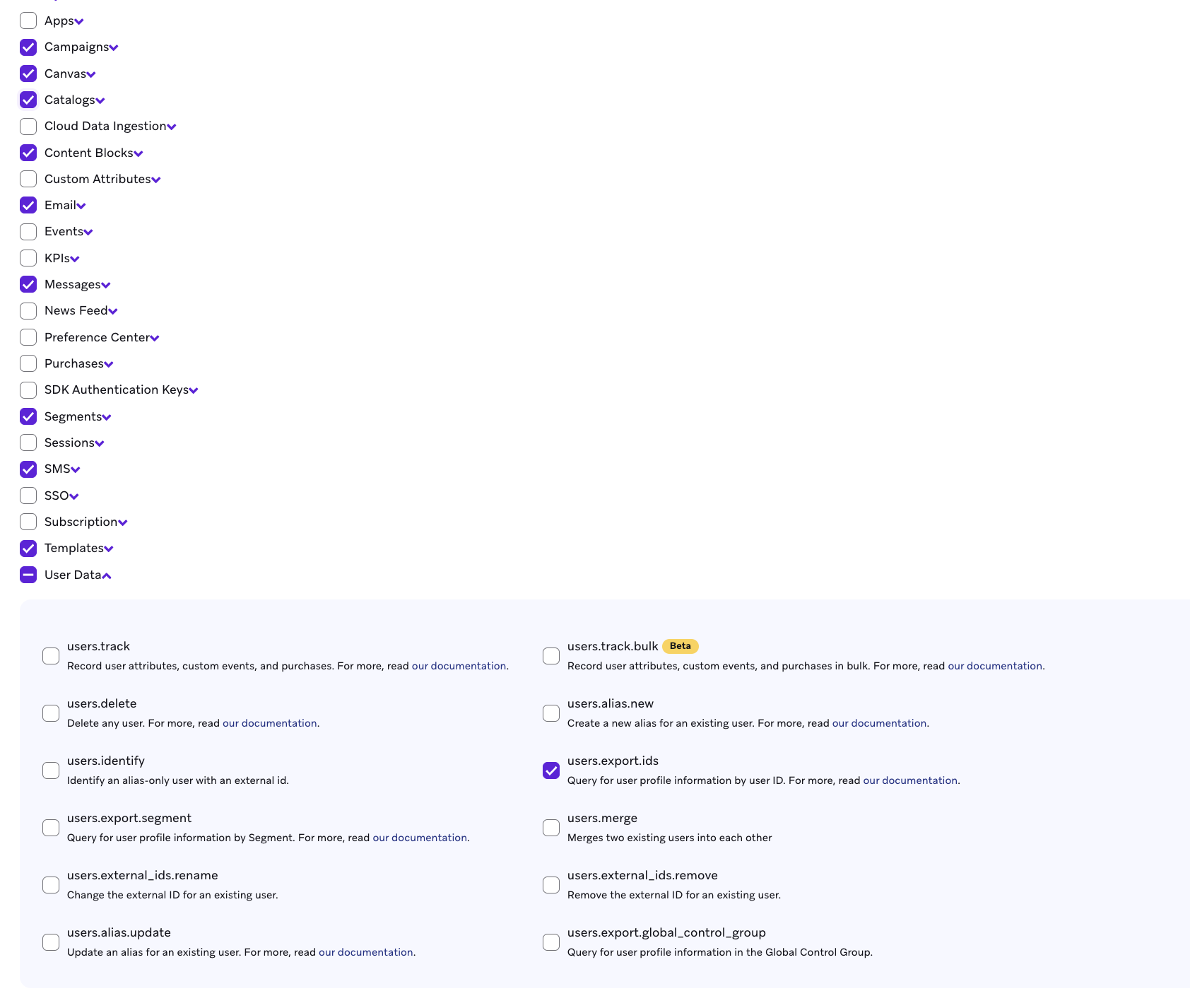
Enable the following permissions:
- Campaigns, Canvas, Catalogs, Content Blocks
- Email, Messages, Segments, SMS, Templates
- User Data →
users.export.ids
-
Click Save.
-
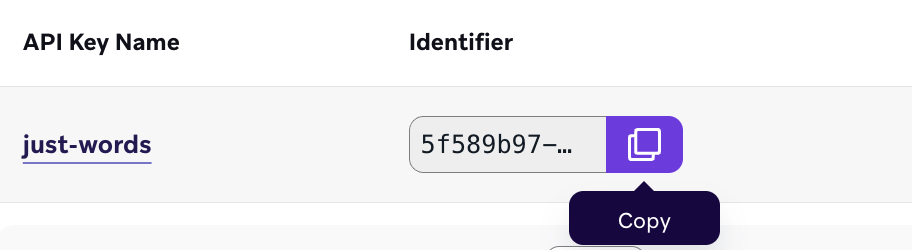
Copy the API key from the table by clicking the copy icon:
Step 2: Store the API Key in JustAI
Section titled “Step 2: Store the API Key in JustAI”-
Navigate to Settings → Integrations.
-
Choose Braze for the Integration.
-
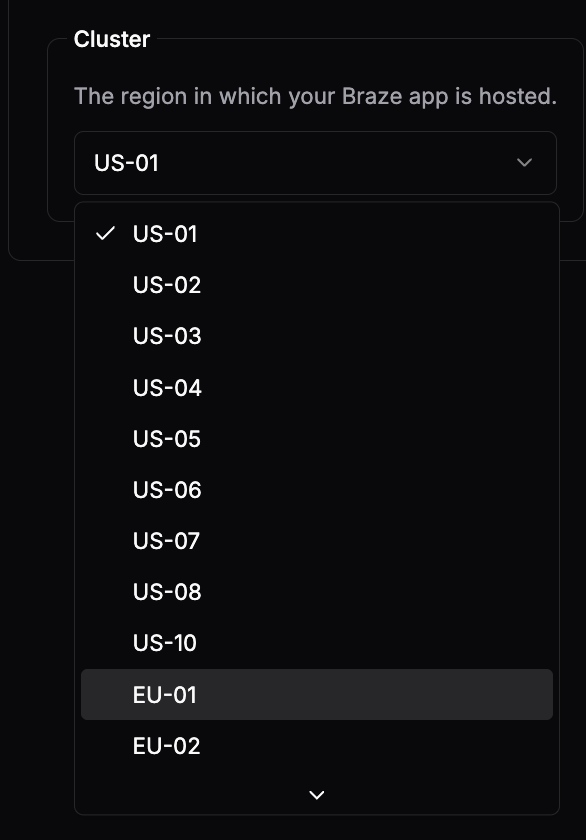
Select the cluster instance (region) where your Braze app is hosted (e.g., US-01, EU-01):
-
Paste the API key from Step 1. Click Verify before saving:

-
Set the App ID as well.
-
Click Save changes.
Template Setup (Connected Content)
Section titled “Template Setup (Connected Content)”Braze uses Connected Content to fetch JustAI content at send time. The connected_content snippet must be placed in your email subject, preheader, and body.
Base Connected Content Snippet
Section titled “Base Connected Content Snippet”The copy-pasteable snippet can be found in the Template Configuration page in the JustAI platform. The snippet will look something like this:
{%- connected_content https://worker.justwords.ai/api/generate/<org_slug>?template_id=<template_id>&tracking_id={{campaign.${dispatch_id}}}-{{${user_id}}}&user_id={{${user_id}}} :save result :rerender :cache_max_age 5 :headers { "x-api-key": "<JUSTAI_API_KEY>", "Content-Type": "application/json" } -%}Usage Pattern
Section titled “Usage Pattern”After the connected_content call, use the result with fallback handling. The snippets from the platform will look something like this:
Subject line:
{%- connected_content https://worker.justwords.ai/api/generate/<org_slug>?template_id=<template_id>&tracking_id={{campaign.${dispatch_id}}}-{{${user_id}}}&user_id={{${user_id}}} :save result :rerender :cache_max_age 5 :headers { "x-api-key": "<JUSTAI_API_KEY>", "Content-Type": "application/json" } -%}{% if result.__http_status_code__ != 200 %}Your fallback subject line{% else %}{{result.copy.vars.subject}}{% endif %}Preheader:
{%- connected_content https://worker.justwords.ai/api/generate/<org_slug>?template_id=<template_id>&tracking_id={{campaign.${dispatch_id}}}-{{${user_id}}}&user_id={{${user_id}}} :save result :rerender :cache_max_age 5 :headers { "x-api-key": "<JUSTAI_API_KEY>", "Content-Type": "application/json" } -%}{% if result.__http_status_code__ != 200 %}Your fallback preheader{% else %}{{result.copy.vars.preheader}}{% endif %}Body:
{%- connected_content https://worker.justwords.ai/api/generate/<org_slug>?template_id=<template_id>&tracking_id={{campaign.${dispatch_id}}}-{{${user_id}}}&user_id={{${user_id}}} :save result :rerender :cache_max_age 5 :headers { "x-api-key": "<JUSTAI_API_KEY>", "Content-Type": "application/json" } -%}{% if result.__http_status_code__ != 200 %}Your fallback body content{% else %}{{result.copy.vars.body}}{% endif %}copy_id Tracking
Section titled “copy_id Tracking”This line is included once per message, after one of the connected_content calls (typically the subject line). It is already included in the copy-pasteable snippet from the Template Configuration page.
{% message_extras :key copy_id :value {{result.copy.id}} %}This attaches the JustAI variant ID to the message for reporting correlation.
Personalization
Section titled “Personalization”JustAI supports two ways to pass user data: attrs and fields.
| Parameter | Purpose | Use When |
|---|---|---|
attrs | Attributes used for ranking and filtering variants (passed as query params) | You want JustAI to select different content based on user segments (e.g., persona, plan type). |
fields | Personalization tokens passed via :body for Braze to prehydrate before rerender | You need to insert user-specific values (e.g., first name) into JustAI content that contains Liquid variables. |
attrs (Variant Selection)
Section titled “attrs (Variant Selection)”Add attrs as query parameters to select content based on user segments:
&attrs.persona={{custom_attribute.${persona}}}&attrs.plan={{custom_attribute.${plan_type}}}Full URL example:
{%- connected_content https://worker.justwords.ai/api/generate/<org_slug>?template_id=<template_id>&tracking_id={{campaign.${dispatch_id}}}-{{${user_id}}}&user_id={{${user_id}}}&attrs.persona={{custom_attribute.${persona}}}&attrs.plan={{custom_attribute.${plan_type}}} :save result :rerender :cache_max_age 5 :headers { "x-api-key": "<JUSTAI_API_KEY>", "Content-Type": "application/json" } -%}fields (Token Replacement)
Section titled “fields (Token Replacement)”Fields are passed as :body params in the connected_content call. This allows Braze to prehydrate the values so they can be injected into JustAI’s response when Braze applies :rerender.
For example, if your JustAI content contains {{first_name}}, you must pass first_name in the :body param. Otherwise, Braze won’t have the value available to substitute during rerender.
:body first_name={{${first_name}}}&city={{custom_attribute.${city}}}Braze Liquid Syntax Reference
Section titled “Braze Liquid Syntax Reference”| Data Type | Syntax | Example |
|---|---|---|
| Standard attribute | {{${attribute_name}}} | {{${first_name}}} |
| Custom attribute | {{custom_attribute.${attribute_name}}} | {{custom_attribute.${persona}}} |
| Event property | {{event_properties.${property_name}}} | {{event_properties.${product_category}}} |
| Canvas entry property | {{canvas_entry_properties.${property_name}}} | {{canvas_entry_properties.${campaign_source}}} |
| Context | {{context.${attribute_name}}} | {{context.${role}}} |
Full Example with Personalization
Section titled “Full Example with Personalization”{%- connected_content https://worker.justwords.ai/api/generate/<org_slug>?template_id=<template_id>&tracking_id={{campaign.${dispatch_id}}}-{{${user_id}}}&user_id={{${user_id}}}&attrs.persona={{custom_attribute.${persona}}}&attrs.plan={{custom_attribute.${plan_type}}} :body first_name={{${first_name}}}&city={{custom_attribute.${city}}} :save result :rerender :cache_max_age 5 :headers { "x-api-key": "<JUSTAI_API_KEY>", "Content-Type": "application/json" } -%}{% if result.__http_status_code__ != 200 %}Fallback content here{% else %}{{result.copy.vars.body}}{% endif %}{% message_extras :key copy_id :value {{result.copy.id}} %}Working with Content Blocks
Section titled “Working with Content Blocks”If your Braze emails use Content Blocks that contain Liquid logic, you need to prehydrate them before they reach JustAI. Braze’s :rerender only hydrates Liquid one level deep, so if a Content Block contains Liquid variables (e.g., {{${first_name}}}), those variables won’t be hydrated when the block is returned from JustAI.
To handle this, pass the Content Block as a field in the :body parameter. This forces Braze to hydrate the Content Block’s Liquid before calling JustAI, so the fully-rendered content is available during the rerender phase.
- In your JustAI copy, reference the content block with the
json_escapefilter:{{ my_content_block | json_escape }} - In the connected_content
:body, pass the prehydrated content block:
:body my_content_block={{content_blocks.${my_content_block}}}Using json_escape is a best practice for Content Blocks, especially complex ones. If you preview the message in Braze and the email doesn’t render correctly (showing the entire JustAI API response instead), adding json_escape to your JustAI variant will usually fix it.
Full example:
{%- connected_content https://worker.justwords.ai/api/generate/<org_slug>?template_id=<template_id>&tracking_id={{campaign.${dispatch_id}}}-{{${user_id}}}&user_id={{${user_id}}} :body my_content_block={{content_blocks.${my_content_block}}}&first_name={{${first_name}}} :save result :rerender :cache_max_age 5 :headers { "x-api-key": "<JUSTAI_API_KEY>", "Content-Type": "application/json" } -%}{% if result.__http_status_code__ != 200 %}Fallback content here{% else %}{{result.copy.vars.body}}{% endif %}{% message_extras :key copy_id :value {{result.copy.id}} %}In this example, my_content_block is fully hydrated by Braze before JustAI receives it. When JustAI’s response includes {{ my_content_block | json_escape }}, Braze substitutes the prehydrated content during rerender.
Reporting (Braze Currents)
Section titled “Reporting (Braze Currents)”JustAI can ingest engagement and custom event data exported from your Braze instance via Braze Currents and a shared S3 bucket.
If you already have a Braze Current set up, you can forward some or all of the events back to JustAI to avoid setting up a new Braze Current.
S3 Integration Steps
Section titled “S3 Integration Steps”- Create an IAM role for the export:
- Recommended Permissions:
s3:PutObject,s3:ListBucket,s3:GetBucketLocation - Share the ARN role with JustAI. JustAI team will grant read/write permissions to a shared S3 bucket.
- Recommended Permissions:
- Create a daily data export that writes data to this S3 bucket:
s3://justwords-metrics-ingest/<org_slug>(replace<org_slug>with your actual org name).
Recommended Braze Currents Configuration
Section titled “Recommended Braze Currents Configuration”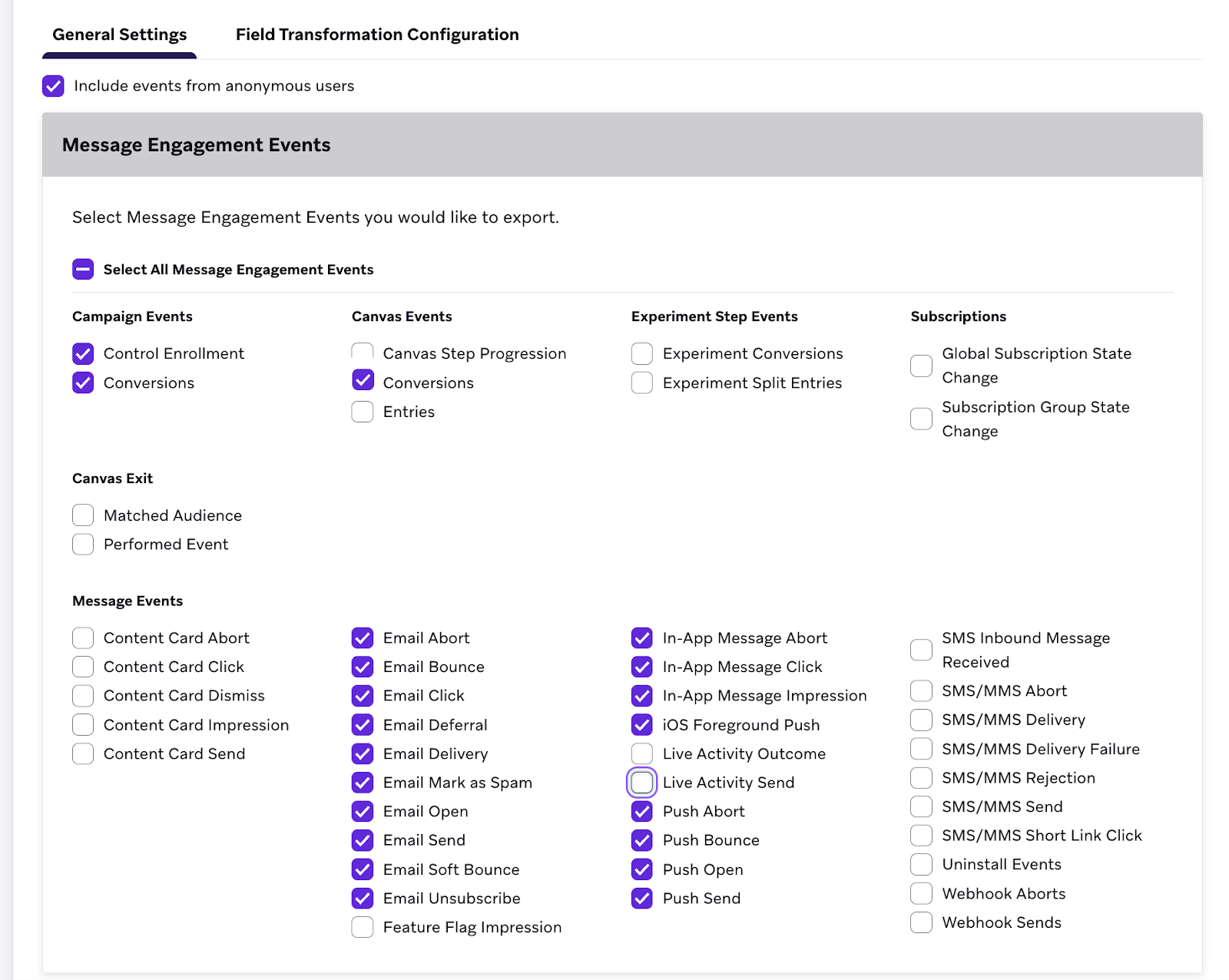
You can re-export the Braze Current data as-is (Avro) back to JustAI. As long as data is partitioned by time (hourly) and uses a common serialization format (gzip, parquet, etc), integration will work. Braze Currents data is already partitioned by event type, making it straightforward to sync only a subset of events.
Common export patterns: Spark jobs, Redshift queries, Databricks jobs.
Configure Template in JustAI
Section titled “Configure Template in JustAI”- In JustAI, open the template and go to Integration Settings.
- Select
Brazeand set:- Template type (Email, Push, In-App, Webhook)
- Canvas ID
- Control step/message IDs
- Treatment step/message IDs
- Save changes.
- In Settings → Integrations, set your Braze API key and cluster so JustAI can sync metadata.
Troubleshooting
Section titled “Troubleshooting”- Connected Content returns empty: Verify your API key is correct and the template_id exists in JustAI.
- Mismatched content across subject/preheader/body: Ensure the connected_content snippet is identical in all locations. Even whitespace differences can cause separate API calls.
JustAI can share data about which content each user received for JustAI-integrated Braze campaigns. The easiest strategy is to set up a daily data export with a shared S3 bucket on your AWS account.
Example Data Payload
Section titled “Example Data Payload”Each record reflects one JustAI API call with a user ID and a tracking ID that uniquely identifies an email/notification in Braze.
{ "event_timestamp": <unix_timestamp>, "user_id": "<string>", "tracking_id": "<string>", "copy_id": "<uuid_string>", "template_id": "<string>", "vars": { "subject": "...", "preheader": "...", "body": "..." }, "attrs": { "persona": "...", "plan": "..." }}In JustAI, each variant has a UUID (copy_id) and a template ID. A template ID corresponds 1:1 with an email/push/etc within a Braze campaign, but there can be many variants per template.
The dispatch_id and user_id uniquely identify an instance of an email/push/etc and are generated by Braze. In our dashboards, we aggregate engagement metrics produced by Braze, grouped by copy_id and date, to show performance of each variant over time.
Implementation
Section titled “Implementation”This is the default approach; alternatives (direct to Snowflake, etc.) are available.
- JustAI provisions an ARN role with read/write access to the shared AWS bucket.
- Client creates a bucket or path in an existing bucket and grants read/write access to the role.
- JustAI exports a backfill of data and sets up a daily export for new records.
- Client transfers data from S3 into their data warehouse (Snowflake, etc.).
Implementation Details
Section titled “Implementation Details”Default configuration (alternatives like Avro are available):
- Exported data is in Parquet format, written to a partitioned path like
.../YYYY/MM/DD/HH. - Backfills are run ad-hoc and overwrite existing data.
- Copy variables can be modified in the frontend, so UUID → vars mapping could change. Generally, we do not modify them once served unless there is a typo or similar issue.
- Copy metadata can be set up as a separate table rather than flattening if that simplifies downstream analysis or storage.
- Retention can be handled as a bucket policy.